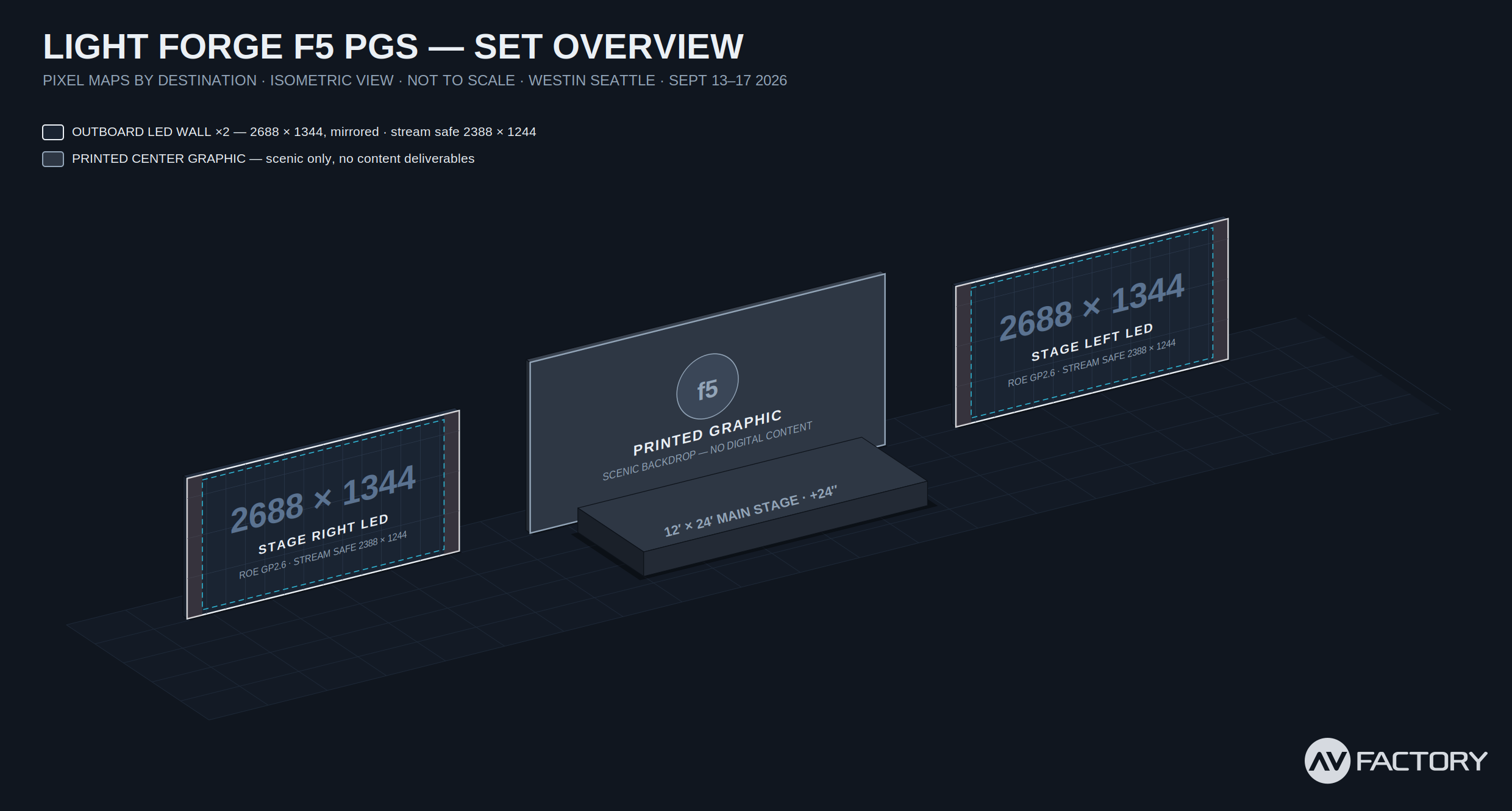
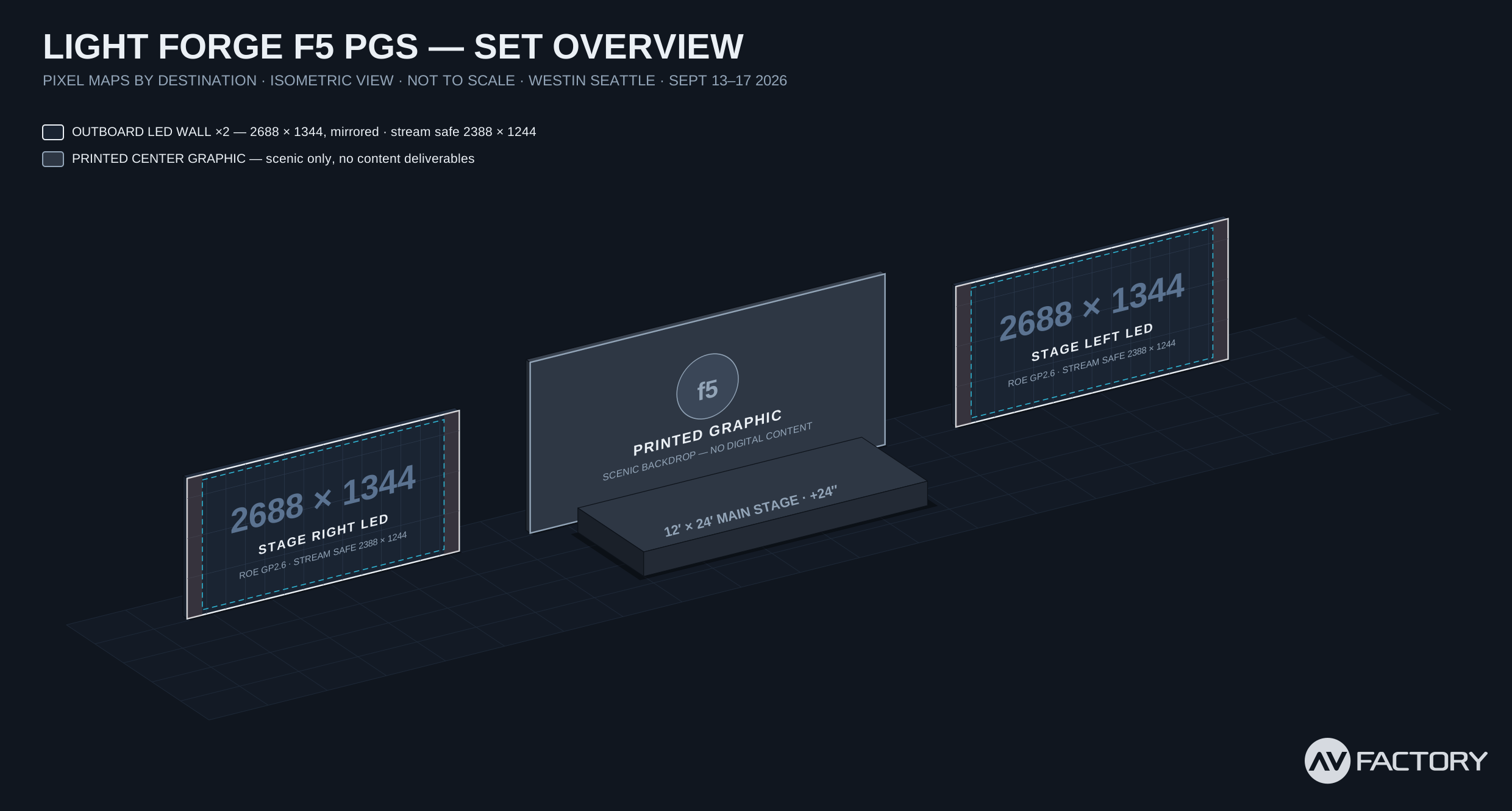
This event uses two identical LED walls flanking a printed backdrop, with content delivered as standard 1920 × 1080 video and 16:9 PowerPoint. The walls are slightly wider than 16:9 (2496 × 1344); your frame is scaled to the full wall height, and the live stream crops that same 16:9 region — delivering your file to the broadcast pixel-for-pixel.
This guide shows how that framing works, where to keep your text so nothing gets clipped, and — for anyone who wants their graphics razor-sharp on the wall itself — the native pixel spec. Questions, early and often: cbaldini@avfactory.com
| Destination | Working Spec | Native Resolution | Physical Size | Content Sources |
|---|---|---|---|---|
| Stage Left LED Wall | 1920 × 1080 (16:9) | 2496 × 1344 | 21'-3⅞" × 11'-5¾" | PlayBack Pro (video/stills) · PowerPoint (16:9 deck) — mirrored: one file drives both walls |
| Stage Right LED Wall | 1920 × 1080 (16:9) | 2496 × 1344 | 21'-3⅞" × 11'-5¾" | |
| Live Stream (derived) | 1920 × 1080 | — | — | Cropped from the wall feed — your fitted 16:9 frame, returned 1:1 |
| Center Backdrop | — | — | — | Printed scenic graphic — no digital content |
LED walls are ROE Visual Graphite GP2.6 (2.6 mm pitch), ground-stacked, fed as one mirrored signal. There is no media server on this show — video and stills roll from PlayBack Pro and slides from PowerPoint. Your 16:9 content is scaled to the full wall height by our playback chain, and the live stream crops its 16:9 program from the same feed. You don't need to think about any of that — deliver clean 1080p and we'll do the rest.
The wall is 13:7 — just 4% wider than your 16:9 frame. That gap has to go somewhere, and there are exactly two choices: fit the frame to the wall's height (slim gaps at the sides) or to its width (shave the top and bottom). We frame everything fit-height unless you specifically ask otherwise — here's why.
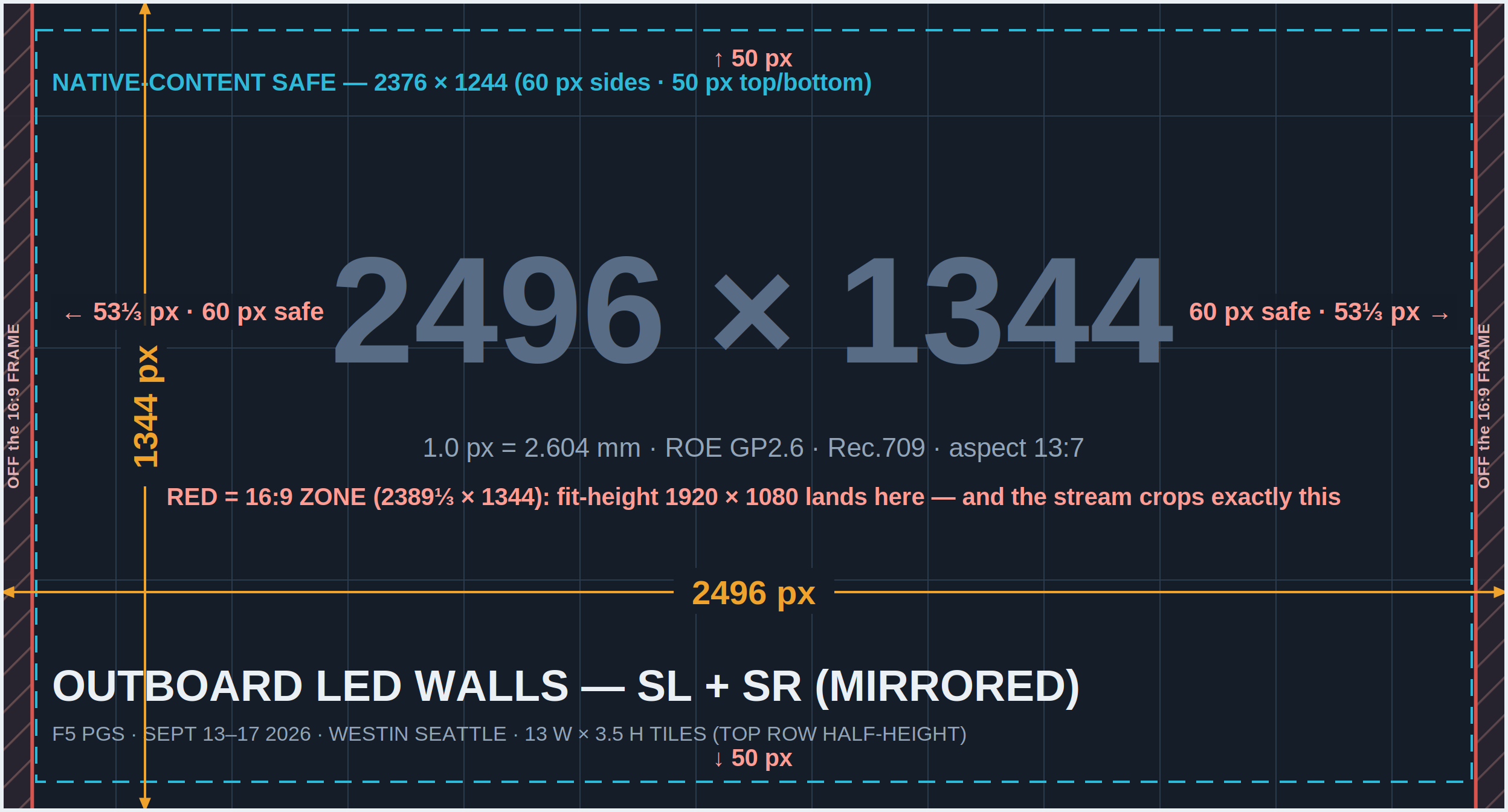
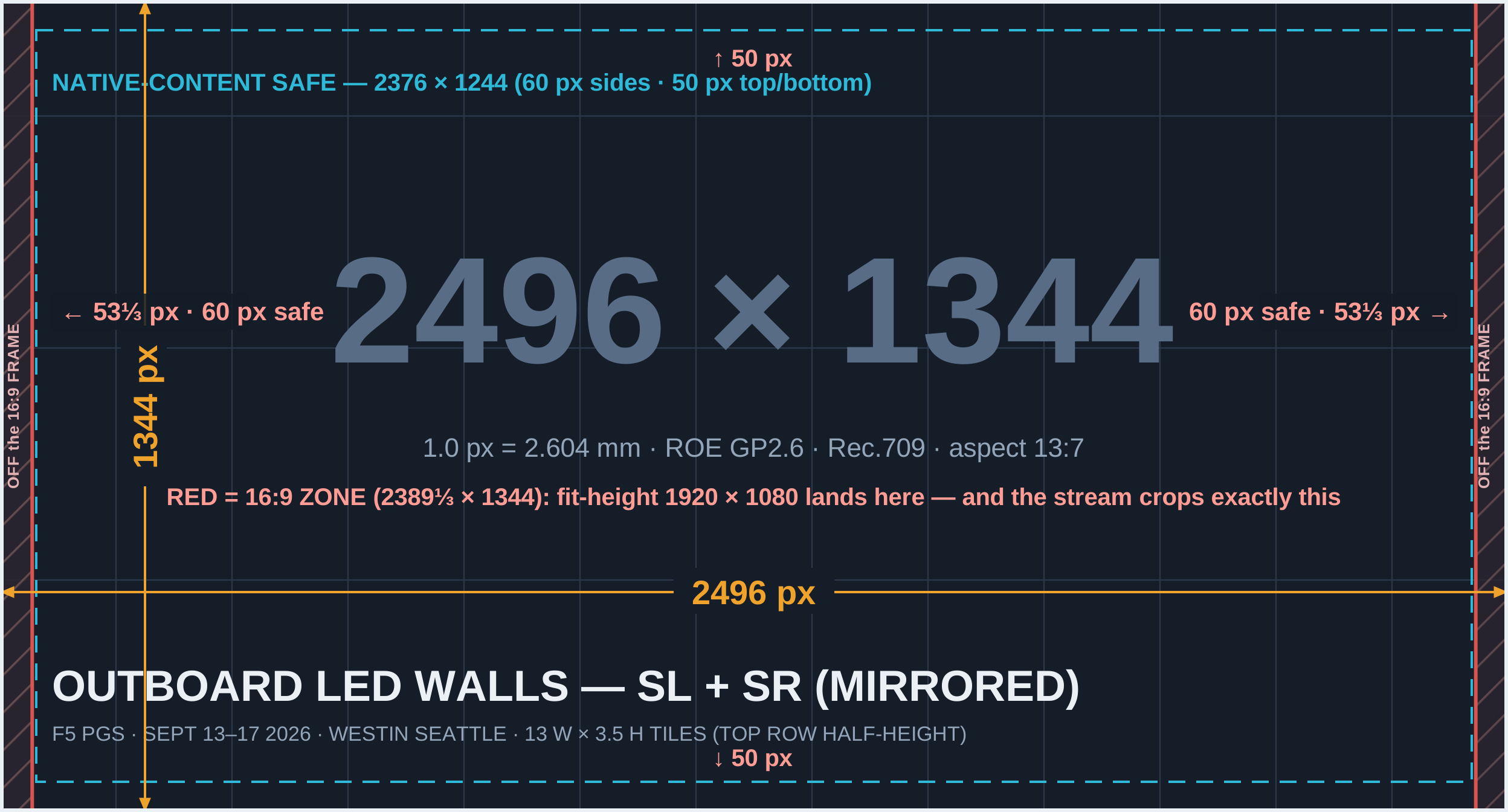
For the curious (and the broadcast team): the wall is built at LED-native density (1 px = 2.604 mm). A full-height 16:9 window on a 13:7 canvas is 2389⅓ × 1344, centered — which is simultaneously where your fitted 1080p frame lands and what the stream crops. Only 53⅓ px per side of wall lives outside it.
| Zone | X Start | X End | Width | Y Range | Contents |
|---|---|---|---|---|---|
| Total canvas | 0 | 2496 | 2496 | 0 – 1344 | Native content fills completely |
| 16:9 zone / stream crop | 53⅓ | 2442⅔ | 2389⅓ | 0 – 1344 | Fitted 1080p frame · what the stream captures |
| Native-content safe | 60 | 2436 | 2376 | 50 – 1294 | Text & logos in native 2496×1344 builds |
Building native? The map is available as a full-resolution PNG (drop into your AE / Photoshop project as an underlay) or as an editable vector SVG, plus the isometric set overview.
⬇ Download all maps (PNG + SVG, .zip)
The following template files are delivered alongside this document:
Build your decks at PowerPoint's default 16:9 widescreen size. They display fitted to the wall height with slim gaps at the sides, and the stream shows them exactly as you designed them. Nothing to configure — this section is mostly about the handful of habits that keep slides clean.
| Slide size | Standard 16:9 (13.333" × 7.5" — PowerPoint's default). No custom sizing needed. |
| Title-safe | Keep text, logos, and charts roughly 0.28" (~40 px) inside every slide edge — PowerPoint's default layouts already do this. |
| File format | .pptx or .key, clearly labeled (e.g. F5PGS_GeneralSession_v3.pptx) |
| Fonts | Embed fonts in the file (File → Options → Save → Embed fonts), and send us any non-standard fonts separately to avoid substitution surprises. |
| Minimum text size | 18 pt absolute floor; 24 pt+ recommended — the wall enlarges your slide 124%, but your back row is 100 feet away and small text softens first. |
| Embedded media | Embed all videos/audio in the deck AND provide each media file separately. No linked/streaming media (YouTube, Stream, etc.) — the show network is offline. |
| Builds & transitions | Simple builds are fine. Avoid exit animations and "random" transitions. |
| Resolution | 1920 × 1080 (16:9) — fitted to wall height by us |
| Preferred codec | Apple ProRes 422 LT best for PlayBack Pro |
| Also accepted | ProRes 422, DNxHR SQ; high-bitrate H.264 (20–30 Mbps) for non-critical pieces |
| Container | .mov |
| Frame rate | 29.97 or 30 progressive — do NOT render 23.98/24 fps |
| Color | Rec.709, video levels; 8- or 10-bit |
| Playback | Operator-triggered, plays once — end on a clean frame or fade to black. Seamless loops: put _LOOP in the filename |
Going native for a hero piece? Same specs at 2496 × 1344, text inside the 2376 × 1244 safe box — tag the file _Native2496.
| Preferred | 48 kHz · 24-bit · stereo, embedded |
| Levels | Mix peaking around −6 dBFS; no limiter slam |
| Silent videos | Strip the audio track entirely rather than including silence |
ProRes decodes with almost no CPU effort — the machine reads it straight to the screen. H.264 needs real-time decompression that can drop frames exactly when it matters. Larger files are expected and fine. If your renderer can't export ProRes, talk to us before inventing an alternative.
For the working 1080p spec, any standard HD preset at 29.97/30 fps is correct — nothing custom. Cutting a native 2496 × 1344 piece, use these:
| Premiere Pro | File → New → Sequence → Settings tab → Editing Mode Custom · Frame Size 2496 h × 1344 v · Timebase 30.00 or 29.97 fps · Square Pixels · Progressive Adobe: create & change sequences |
| DaVinci Resolve | Project Settings → Master Settings → Timeline Format → Timeline Resolution Custom 2496 × 1344 · Frame Rate 30 / 29.97. 2496 × 1344 fits inside the free version's UHD limit — no Studio license needed. Blackmagic: Resolve manuals & support |
| Final Cut Pro | File → New → Project → Use Custom settings → Format Custom · 2496 × 1344 · Rate 30p / 29.97p Apple: create a project |
| Preferred | .wav — 48 kHz · 24-bit · stereo |
| Also fine | .mp3 320 kbps (fine for music; use WAV for anything with a hard downbeat) |
| Trim | Start the file at the moment it should be heard — no leading silence; we fire cues on the frame |
| Naming | One file per cue, named for the moment: F5PGS_AwardSting_Partner_v1.wav |
| Levels | Peaks around −6 dBFS, consistent loudness across the set |
For general ambient music, a Spotify playlist link is all we need — send it with your content delivery and note any tracks that must (or must not) play at specific times. If your organization requires licensed/cleared music only, send us the files instead as .wav or .mp3.
| Resolution | 1920 × 1080 (working spec) or native 2496 × 1344 for the sharpest wall |
| Format | .png (preferred) or .tiff — no JPEG for show graphics |
| Color | sRGB / Rec.709, 8-bit+, no embedded printer profiles |
| Safe margin | ~40 px in a 1080p file · 60 px sides / 50 px top-bottom in a native file |
| Vector (preferred) | .svg, .ai, or .eps |
| Raster | .png with transparency, 24-bit, largest size available |
| Brand kit | Send your brand guide (colors, clear-space, don'ts) so anything we build on site stays on-brand |
| Naming pattern | F5PGS_[Content]_v[#].[ext] e.g. F5PGS_WalkIn_v2.mov · F5PGS_GeneralSession_v1.pptx |
| Optional tags | _Native2496 (built at 2496 × 1344) · _LOOP (seamless loop). Untagged files are assumed 1920 × 1080 / 16:9. |
| Versioning | Increment v1 → v2 → v3 with every change. Please never use "FINAL", "FINAL2", or "FINALfinal" — we've all been there, and it never ends well. |
| Deadlines | All show content due Monday, Sept 7, 2026 (one week before load-in). Anything after that lands in the on-site change queue and is handled as time allows. |
| Delivery | WeTransfer to cbaldini@avfactory.com for day-to-day deliveries and revisions. For the final show package a hard drive hand-off is welcome (exFAT-formatted so it reads on everything; label the drive with the event name). No email attachments over 20 MB, please. |